
- What Is Keyword Research?
- Why Free Tools Are Enough to Start
- The 3 Metrics That Matter Most
- Best Free Keyword Research Tools 2026
- How to Find Low Competition Keywords Free
- Search Intent — The Factor Everyone Ignores
- Beginner Keyword Research Step by Step
- Common Mistakes to Avoid
- Final Keyword Checklist
What Exactly Is Keyword Research — and Why Should You Care?
Keyword research is the process of finding the exact words and phrases that real people type into search engines like Google when looking for information, products, or solutions. Think of keywords as the bridge between what someone needs and what a website offers. Without that bridge, even the most brilliantly written content sits invisible, gathering digital dust.
For students stepping into digital marketing and for marketers managing tight budgets, keyword research for beginners free is not just a nice-to-have skill — it is the foundation of every successful SEO strategy. The moment a marketer understands what the audience is searching for, the entire content creation process becomes sharper, faster, and measurably more effective.
Quick Definition
Keyword research for beginners free = the practice of identifying search terms your target audience uses, using zero-cost tools, to create content that ranks on Google without spending a single rupee or dollar on paid SEO software.
Why Are Free Keyword Research Tools Enough for Beginners?
Paid tools like Ahrefs or SEMrush are powerful — nobody is disputing that. But for beginners, the $99–$199/month price tag is a wall, not a door. The good news? The free keyword research tools for beginners available today offer more than enough data to build a solid SEO strategy from scratch.
Google itself provides some of the most reliable keyword data through its own free products. Combine that with a handful of smart third-party tools, and the result is a research process that rivals paid alternatives — especially when the focus stays on how to find low competition keywords free, which is where most beginners win their first Google rankings.
“Winning on Google is not about who has the biggest budget. It is about who understands their audience’s actual questions better than anyone else.”
What Are the Best Free Keyword Research Tools in 2026?
The best free keyword research tools 2026 have genuinely improved. Many now offer volume estimates, difficulty scores, and related keyword suggestions — all without a credit card. Here is a breakdown of the top options:
| Tool | Best For | Key Feature | Cost |
| Google Keyword Planner | Volume data from the source | Real Google search data, CPC info | Free |
| Ubersuggest | Beginners needing difficulty scores | KD score, content ideas, competitor data | 3 searches/day free |
| Google Search Console | Analyzing existing site performance | Real impressions & clicks from your own site | Free |
| AnswerThePublic | Finding question-based keywords | Visualizes hundreds of related questions | Limited free searches |
| Keyword Surfer (Chrome) | Quick volume checks on Google | Shows volume directly on Google results page | Free |
| Google Trends | Checking keyword seasonality | Shows keyword popularity over time by region | Free |
| Semrush Free Plan | Limited daily competitor research | 10 free queries/day, including organic data | 10 queries/day |
Pro Insight
Start with Google Keyword Planner + Keyword Surfer as the core combo. These two tools together give volume data, competition estimates, and live SERP data — completely free — making them the ideal starting point for keyword research for beginners.
How Do You Actually Find Low Competition Keywords for Free?
The single biggest mistake beginners make is targeting keywords like “digital marketing” or “best laptop” — terms where page 1 of Google is dominated by massive brands with decade-old domain authority. The smart move, and the method every experienced SEO professional relies on, is going after long-tail keywords.
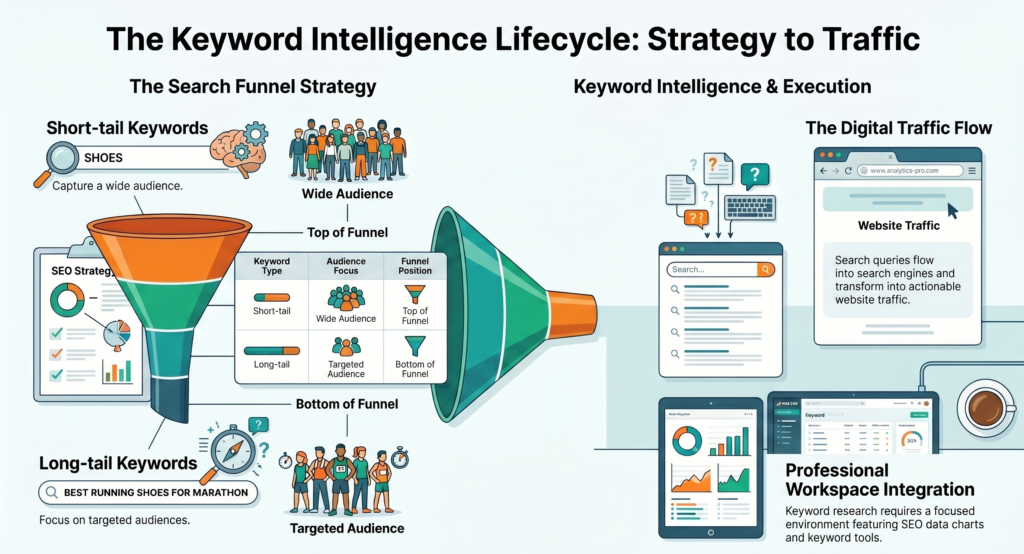
Long-tail keywords are search phrases with three or more words. They have lower search volume but dramatically lower competition, which makes them the fastest path to Google page 1 for a new website. How to find low competition keywords for free is a skill that comes down to one core technique: layering specificity.
Example — Short-Tail vs. Long-Tail
- Short-tail (avoid): “keyword research” — KD: 72, Volume: 90,000/mo
- Long-tail (target): “keyword research for beginners free” — KD: 18, Volume: 1,600/mo
- Same topic. Completely different ranking difficulty. The long-tail version is winnable within weeks.
Three Proven Methods to Find Low Competition Keywords
1 Google Autocomplete Mining
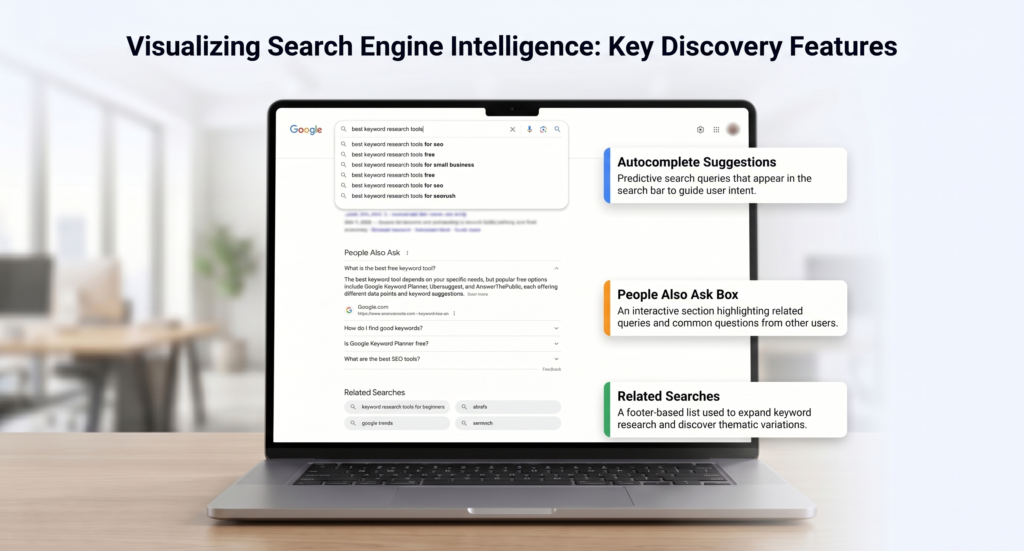
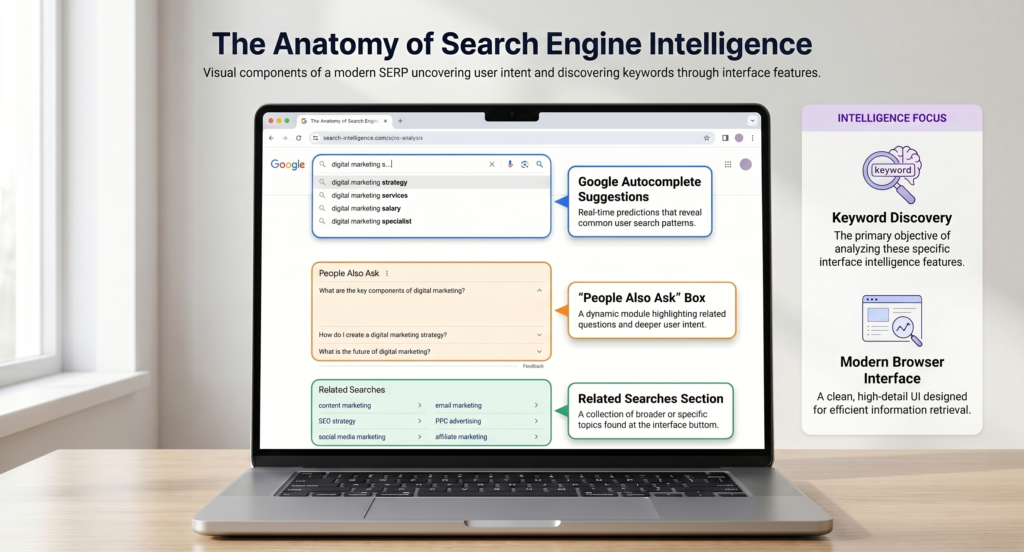
Type a broad keyword into Google’s search bar and stop before pressing Enter. Google auto-suggests real search queries from real users. These suggestions are pre-filtered for popularity and often reveal long-tail gems with surprisingly low competition. Try “keyword research for be…” and watch what appears.
2 “People Also Ask” Section Analysis
Every Google results page now includes a “People Also Ask” box — a goldmine for question-based keywords. Each question represents a real user’s need. Clicking any question expands more questions, creating an endless rabbit hole of content ideas perfectly aligned with free keyword research tools for beginner workflows.
3 Related Searches at the Bottom of Google
After searching any keyword, scroll to the very bottom of the results page. Google displays 8 related searches. These are algorithmically selected based on what users actually search next — meaning they carry real demand and often lower competition than the original query.
What Is Search Intent and Why Does It Matter More Than Volume?
Search volume tells how many people search a keyword. Search intent tells why they are searching. Creating content that matches the wrong intent is like opening a bakery and serving car parts — technically, both are businesses, but the customers are not looking for what is being offered.
Understanding intent is what separates a keyword research for SEO beginners guide that produces rankings from one that produces confusion. Every search query falls into one of four intent categories:
Informational
User wants to learn something. Example: “what is keyword research”
Navigational
User wants a specific website. Example: “Ahrefs login”
Commercial
User is comparing options before buying. Example: “best free keyword tools 2026”
Transactional
User is ready to take action. Example: “buy Ahrefs subscription”
For students and beginner marketers, informational and commercial keywords are the highest-value targets. Blog posts, guides, and comparison articles satisfy these intent types — exactly the content format that dominates search rankings for beginner keyword research step-by-step queries.
Beginner Keyword Research Step by Step — The Full Process
This is the practical workflow — the exact process used by professional SEOs, simplified for anyone starting from zero. Each step builds on the previous one, creating a research system that produces consistent, rankable keyword lists using only free tools.
1 Define the Niche and Core Topic
Write down 5–10 broad topics related to the website’s niche. A digital marketing blog might list: SEO basics, content writing, social media, email marketing, analytics. These broad topics become “seed keywords” — the starting point for every keyword list.
2 Generate Keyword Ideas Using Free Tools
Enter each seed keyword into Google Keyword Planner and Ubersuggest. Export every suggested keyword — even the ones that seem irrelevant at first. The goal at this stage is volume: collect 50–100 keyword ideas per seed topic before filtering.
3 Filter by Difficulty and Volume
Remove any keyword with a difficulty score above 35 (too competitive for new sites) and any keyword with fewer than 50 monthly searches (not enough traffic to justify the effort). The remaining list contains the best candidates for how to do keyword research for free effectively.
4 Verify Intent by Checking Google Manually
For each shortlisted keyword, search it on Google and look at the top 5 results. Are they blog posts, product pages, or videos? The format of the top-ranking content reveals exactly what type of content Google wants to see — and what needs to be created to compete.
5 Cluster Keywords by Topic
Group related keywords into clusters. For example: “keyword research for beginners free,” “beginner keyword research step by step,” and “how to do keyword research for free” all belong in the same content cluster. One well-structured article can target all three simultaneously — a strategy called keyword clustering.
6 Prioritize and Create a Content Calendar
Rank the keyword clusters by business relevance and ranking potential. The easiest wins — low difficulty, moderate volume, clear informational intent — go first. Build a 3-month content calendar that systematically publishes content for each cluster, tracking rankings monthly in Google Search Console.
What Mistakes Do Most Beginners Make in Keyword Research?
Learning from common errors shortens the learning curve dramatically. The following mistakes appear consistently across beginner blogs and student projects:
Targeting high-volume keywords immediately — New websites have zero authority. Competing for “digital marketing” against Forbes or HubSpot is not a strategy; it is a recipe for frustration. Always begin with keywords under 30 KD.
Ignoring search intent — Writing a 2,000-word blog post for a keyword where Google only ranks product pages wastes time. Always check actual SERP results before writing a single word.
Keyword stuffing — Repeating a keyword 30 times in a 500-word article no longer tricks Google. In fact, modern algorithms penalize unnatural keyword density. Use the primary keyword naturally, 1–2 times per 300 words.
Skipping Google Search Console — Many beginners use external tools but never set up Search Console. This free tool shows exactly which queries bring visitors to a website — arguably the most accurate keyword data available.
Researching once and never revisiting — Search trends shift. A keyword with low competition today might attract competitors within 6 months. Revisiting and refreshing keyword research quarterly keeps any content strategy ahead of the curve.
What Does a Complete Keyword Research Checklist Look Like?
Before publishing any piece of content, running through this checklist ensures the keyword strategy is solid. Use this for every article, landing page, or blog post:
Keyword Research Checklist — Pre-Publishing
✔ Primary keyword identified with verified search volume
✔ Keyword difficulty confirmed below 35 for new sites
✔ Search intent verified by checking top 5 Google results
✔ 3–5 secondary/LSI keywords included naturally in the content
✔ Primary keyword in: title tag, H1, first 100 words, meta description
✔ No keyword stuffing — natural density maintained throughout
✔ Content format matches what Google already ranks (blog post, list, how-to, etc.)
✔ Internal links to related content added
✔ Google Search Console connected and sitemap submitted
How Long Does It Take to See Results from Keyword Research?
Setting realistic expectations matters. Content targeting low-competition keywords on a new website typically begins appearing in Google’s index within 2–4 weeks of publishing. Climbing to page 1 positions for a keyword with 10–20 KD usually takes 2–4 months of consistent publishing and basic link building.
The keyword research for beginners free approach works — but patience is non-negotiable. SEO is not a sprint; it is a compounding investment. The blog post published today, targeting the right low-competition keyword, can generate organic traffic for the next three to five years without a single additional rupee spent.
FAQ Section
1 Can I do keyword research completely for free as a beginner?
Yes — completely. Google Keyword Planner, Google Search Console, Google Trends, Keyword Surfer (Chrome extension), and Ubersuggest’s free tier together provide search volume, keyword difficulty, and competition data at zero cost.
No paid subscription is required to build a full keyword strategy as a beginner. The free tools available in 2026 cover every core research need: volume data, difficulty scoring, intent analysis, and related keyword discovery.
2 What is the best free keyword research tool for beginners in 2026?
Google Keyword Planner is the single best starting point — it pulls data directly from Google’s own search database, making the volume estimates the most accurate available for free.
For a complete beginner stack: use Google Keyword Planner for volume data + Keyword Surfer (free Chrome extension) for live competition checks directly on Google search results + AnswerThePublic for question-based keyword ideas. All three together cost nothing.
3 How do I find low competition keywords for free as a beginner?
Three methods work reliably without any paid tools:
1. Google Autocomplete — Type a broad keyword and stop before pressing Enter. The suggested completions are long-tail, lower-competition variations of that term.
2. “People Also Ask” box — Every Google results page shows 4–8 question-based keywords with real search demand and typically low keyword difficulty.
3. Target keywords with 3+ words (long-tail) — Longer, more specific phrases have less competition by default. A keyword like “free keyword research for beginners step by step” is far easier to rank for than just “keyword research.”
4 How long does keyword research take for a beginner?
For a single blog post or article, 30 to 60 minutes is sufficient using free tools. This covers: identifying 5–10 seed keywords, generating a list of 30–50 related terms, filtering by difficulty and volume, and verifying search intent manually on Google.
For a full content strategy covering 10–15 topics, expect 3 to 5 hours spread across one or two sessions. Speed improves significantly after the first few research sessions as the process becomes routine.
5 What keyword difficulty score should beginners target?
Beginners with new websites (under 6 months old, low domain authority) should target keywords with a Keyword Difficulty (KD) score of 0–30. This range represents genuinely winnable positions on Google page 1 within 2–4 months of publishing well-structured content.
Keywords with KD 31–50 become viable once the site has at least 20–30 published articles and some backlinks. Keywords above KD 60 are best left to established sites with strong domain authority — competing there as a beginner wastes time and effort.
6 Does keyword research still matter in 2026 with AI changing search?
Yes — keyword research matters more in 2026, not less. AI-powered search engines (Google’s AI Overviews, SearchGPT, Perplexity) still pull answers from indexed web pages. The pages chosen as sources are the ones that best match a specific search query, which is determined directly by keyword alignment and content relevance.
The difference in 2026 is that search intent and topical authority carry more weight than raw keyword density. Content that thoroughly answers a specific question around a well-researched keyword gets cited by AI search engines as a trusted source — making keyword research the gateway to both traditional and AI-powered search visibility.